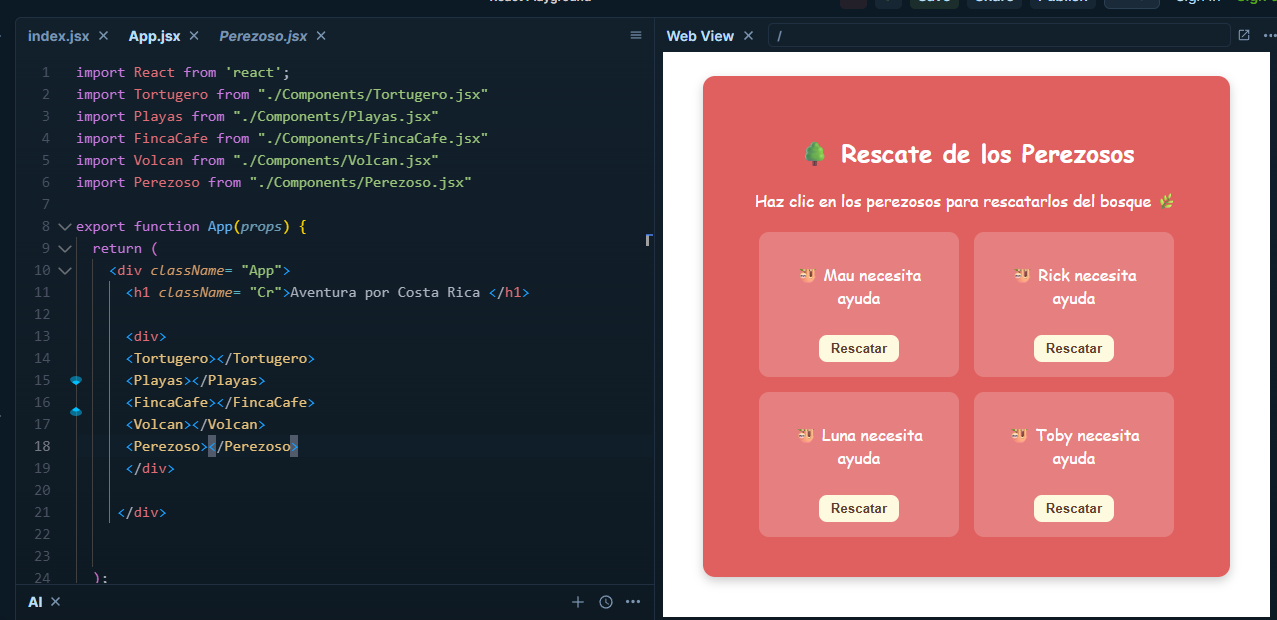
We are almost done with our trip through Costa Rica! To finish, let’s learn a bit about sloths.
Sloths in Costa Rica are an icon of the country, and there are two species: the two-toed sloth (Choleopus hoffmanni) and the three-toed sloth (Bradypus variegatus). They are known for their slowness, their ability to camouflage, and for being national symbols that represent Costa Rica’s connection with nature. You can spot them in national parks like Manuel Antonio and Corcovado, and in areas like La Fortuna and Cahuita.
Write this file "Perezoso.jsx":
Important to use:
1. import { useState } from "react";
A component inside another component
In this activity we are going to use two components:
- A small component: Perezoso
- A large component: Perezosos
This means we create a small component (like a cookie cutter) and then use it many times inside the large component.
// Componente pequeño
function Perezoso() {
  return <p>Soy un perezoso</p>;
}

// Componente grande
export default function Perezosos() {
  return (
    <Perezoso />
  );
}
Props, information that the component receives
Props are information that we send from the large component to the small component.
The Perezoso component will receive:
- nombre
- onRescatar
- rescatado
function Perezoso({ nombre, onRescatar, rescatado }) {
  return <p>{nombre}</p>;
}
This is how they are sent:
<Perezoso
  nombre="Marcos"
  onRescatar={rescatar}
  rescatado={false}
/>
Inside the Perezoso component goes this code
<div className={`perezoso-card ${rescatado ? "rescatado" : ""}`}>
      <p>
        {rescatado
          ? `${nombre} está a salvo!`
          : `${nombre} necesita ayuda`}
      </p>

      {!rescatado && (
        <button onClick={() => onRescatar(nombre)}>Rescatar</button>
      )}
    </div>
1. Main container with dynamic classes
<div className={`perezoso-card ${rescatado ? "rescatado" : ""}`}>
- It always uses the perezoso-card class from style.css.
- If the sloth has already been rescued (
rescatado === true), it also adds therescatadoclass. - This is used to change styles based on its state.
It is like giving it a special sticker when it has been saved. The “rescatado” class is that sticker.
2. Text that changes based on the sloth’s state
<p>
  {rescatado
      ? `${nombre} está a salvo!`
      : `${nombre} necesita ayuda`}
</p>
- If rescatado is true, it shows a message that it is safe.
- If it is false, it shows that it needs help.
- The
? :is an “if it is rescued → show this, if not → show the other”.
It is like a traffic light:
If it is green → it is already safe!
If it is yellow → it still needs help.
3. Button that appears only if it is NOT rescued
{!rescatado && (
  <button onClick={() => onRescatar(nombre)}>Rescatar</button>
)}
- !rescatado means “NOT rescued”.
- If this is true, the button is shown.
- If it is already rescued → the button disappears.
- The button executes
onRescatar(nombre)when you press it.
It is like a “help it!” button. If it is already fine, the button hides because you no longer need it.
Create a function called Perezosos
A constant called rescatados and setRescatados.
Another constant called perezosos, and add sloth names to it.
Constant to rescue the sloths! const rescatar = (nombre) => { setRescatados([…rescatados, nombre]); };
---
<div class="notices info" >
<p header-value="Info"><h3 id="create-a-list-of-components-with-a-for-loop">Create a list of components with a for loop</h3>
<div class="highlight"><pre tabindex="0" style="color:#272822;background-color:#fafafa;-moz-tab-size:4;-o-tab-size:4;tab-size:4;-webkit-text-size-adjust:none;"><code class="language-jsx" data-lang="jsx"><span style="display:flex;"><span><span style="color:#00a8c8">let</span> <span style="color:#75af00">listaPerezosos</span> <span style="color:#f92672">=</span> <span style="color:#111">[];</span>
</span></span><span style="display:flex;"><span>
</span></span><span style="display:flex;"><span><span style="color:#00a8c8">for</span> <span style="color:#111">(</span><span style="color:#00a8c8">let</span> <span style="color:#75af00">i</span> <span style="color:#f92672">=</span> <span style="color:#ae81ff">0</span><span style="color:#111">;</span> <span style="color:#75af00">i</span> <span style="color:#f92672"><</span> <span style="color:#75af00">perezosos</span><span style="color:#111">.</span><span style="color:#75af00">length</span><span style="color:#111">;</span> <span style="color:#75af00">i</span><span style="color:#f92672">++</span><span style="color:#111">)</span> <span style="color:#111">{</span>
</span></span><span style="display:flex;"><span> <span style="color:#75af00">listaPerezosos</span><span style="color:#111">.</span><span style="color:#75af00">push</span><span style="color:#111">(</span>
</span></span><span style="display:flex;"><span> <span style="color:#111"><</span><span style="color:#f92672">Perezoso</span>
</span></span><span style="display:flex;"><span> <span style="color:#75af00">key</span><span style="color:#f92672">=</span><span style="color:#111">{</span><span style="color:#75af00">i</span><span style="color:#111">}</span>
</span></span><span style="display:flex;"><span> <span style="color:#75af00">nombre</span><span style="color:#f92672">=</span><span style="color:#111">{</span><span style="color:#75af00">perezosos</span><span style="color:#111">[</span><span style="color:#75af00">i</span><span style="color:#111">]}</span>
</span></span><span style="display:flex;"><span> <span style="color:#75af00">onRescatar</span><span style="color:#f92672">=</span><span style="color:#111">{</span><span style="color:#75af00">rescatar</span><span style="color:#111">}</span>
</span></span><span style="display:flex;"><span> <span style="color:#75af00">rescatado</span><span style="color:#f92672">=</span><span style="color:#111">{</span><span style="color:#75af00">rescatados</span><span style="color:#111">.</span><span style="color:#75af00">includes</span><span style="color:#111">(</span><span style="color:#75af00">perezosos</span><span style="color:#111">[</span><span style="color:#75af00">i</span><span style="color:#111">])}</span>
</span></span><span style="display:flex;"><span> <span style="color:#111">/></span>
</span></span><span style="display:flex;"><span> <span style="color:#111">);</span>
</span></span><span style="display:flex;"><span><span style="color:#111">}</span>
</span></span></code></pre></div></p>
</div>
#### How it is displayed
```jsx
return (
<div className="perezosos-container">
<h2>Rescate de los Perezosos</h2>
<p className="instruccion">
Haz clic en los perezosos para rescatarlos del bosque
</p>
<div className="lista-perezosos">{listaPerezosos}</div>
{rescatados.length === perezosos.length && (
<h3 className="mensaje-final">
Has rescatado a todos los perezosos!
</h3>
)}
</div>
);
DON’T FORGET TO IMPORT IT IN APP.JSX
import Perezosos from "./Components/Perezoso.jsx"